
Written by NexxPlay Editorial Team • Published August 20, 2026 • Last updated August 20, 2026

AI tools are no longer useful only for experimenting, brainstorming, or generating quick drafts. In 2026, freelancers, creators, developers, marketers, and small-business owners can use AI to reduce repetitive work, deliver services faster, and build new income streams.
But there is an important distinction: AI itself does not create income. The value comes from how you use it to solve a real problem for a real customer.
A freelancer can use AI to research and write content. A designer can produce visual concepts faster. A developer can speed up coding and automation. A creator can repurpose one video into several pieces of content. A small business owner can use AI to create marketing assets, website content, and customer workflows.
This guide covers 25 major AI tools across writing, research, design, video, coding, automation, and business building. At the end, you will also find 5 free NexxPlay tools that can be used inside practical freelance and content workflows.
Quick Answer: The Best AI Tools to Make Money at a Glance
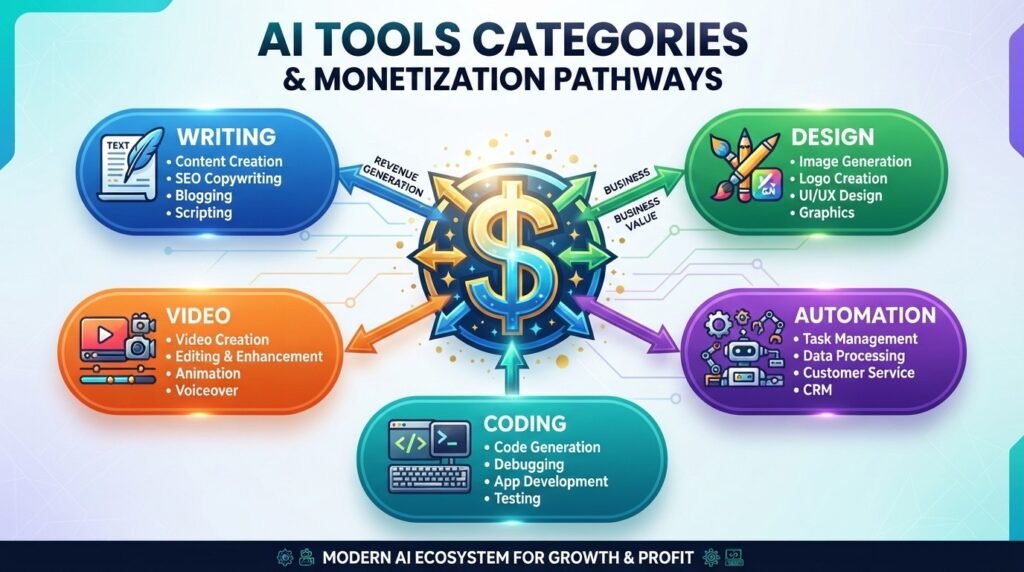
The best AI tools to make money in 2026 depend on the service you want to sell.
For writing and research, tools such as ChatGPT, Gemini, Claude, Jasper, Copy.ai, Writesonic, and Perplexity can help with research, drafting, editing, and content production.
For design, Midjourney, Canva Magic Studio, Adobe Firefly, and Leonardo AI can speed up visual asset creation.
For video and audio services, Runway, Descript, CapCut, ElevenLabs, Synthesia, and Pictory can help with video production, editing, voiceovers, training content, and content repurposing.
For technical services, GitHub Copilot, Cursor, Replit, Zapier, and Make can help developers and automation specialists increase their output.
For business building, Gamma, Shopify Magic, and Durable can help entrepreneurs create presentations, ecommerce content, and business websites.
The most important takeaway is simple: choose tools based on the problem you can solve, not on how many AI products you can collect.
Key Takeaways
- AI works best as a productivity multiplier, not as a replacement for human skill.
- Choose AI tools around a specific customer problem and a clear service offer.
- Human editing, fact-checking, testing, and quality control are still essential.
- A strong AI business usually combines a small number of tools into a repeatable workflow.
- Internal links to useful NexxPlay tools can turn informational traffic into practical tool users.
- Local businesses can benefit from AI services such as website creation, content production, automation, and marketing support.
- A good article should be useful to readers while also being structured so search engines and AI answer systems can understand it easily.
The 2026 AI Earning Shift: Why Your Strategy Matters More Than the Tool
The biggest mistake people make when trying to earn money with AI is searching for a tool that will somehow generate income automatically.
There is no magic button.
AI can make research faster, generate a first draft, organize information, write code, create images, produce audio, and automate repetitive workflows. But someone still needs to understand the customer, define the objective, check the result, and deliver something useful.
That is why the real competitive advantage in 2026 is not simply access to AI.
It is execution.
AI does not make money by itself
Imagine two freelancers using the same AI writing tool.
One freelancer copies the first output, sends it to the customer, and moves on.
The other freelancer researches the topic, creates a detailed brief, uses AI for a first draft, fact-checks the information, adds the client’s brand voice, improves the structure, optimizes the content for search, and delivers a polished final product.
They may be using the same software.
But they are selling two completely different levels of service.
The second freelancer is much more likely to build a sustainable business because the customer is paying for the outcome, not the AI tool.
What has changed for freelancers, creators, developers, and small businesses
Clients increasingly expect faster delivery, better communication, stronger customization, and higher-quality output.
AI can make those expectations easier to meet, but raw AI output is rarely enough.
Writers still need editorial judgment.
Designers still need visual direction.
Developers still need testing and security review.
Marketers still need positioning and strategy.
Business owners still need to understand their customers.
AI can accelerate the work, but it does not remove the need for expertise.
How to choose profitable AI software for your market
Before subscribing to another AI tool, ask three questions:
- What customer problem does this tool help me solve?
- Can I turn that result into a service people are willing to pay for?
- Will the tool make my workflow meaningfully faster or better?
The best AI stack is usually not the biggest one.
It is the one that helps you deliver a useful result consistently.
Why originality and quality control still matter
AI systems can produce inaccurate facts, repetitive language, generic suggestions, and incorrect technical information.
That means every professional workflow should include human review.
Before delivering work, check important facts, links, citations, claims, code, formatting, client requirements, and anything that could damage the customer’s business.
AI Writing and Research Tools for Freelance Income
Writing and research remain some of the easiest areas in which to build AI-assisted services.
Freelancers can use AI to speed up research, generate drafts, create outlines, summarize documents, produce marketing content, and organize information.
The important part is not to sell “AI-generated writing.”
Instead, sell a professional outcome such as blog production, SEO content, research briefs, email campaigns, documentation, or marketing copy.
ChatGPT
Overview: ChatGPT Official Website
ChatGPT is a general-purpose AI assistant that can support writing, brainstorming, research assistance, content planning, summarization, and many other workflows.
Features and monetization: Content briefs, blog drafts, email campaigns, customer support scripts, research summaries, product descriptions, and freelance writing packages.
You can monetize ChatGPT by offering structured writing services rather than simply selling prompts. For example, you can provide monthly blog packages, email sequences, website copy, or customer-support documentation.
Pros: Versatile, flexible, useful for many business workflows, and strong for idea generation.
Cons: Important facts still need verification, output can sound generic, and professional results require human editing.
Gemini
Overview: Google Gemini Official Website
Google Gemini is a major general-purpose AI assistant that can support writing, brainstorming, research, summaries, and productivity workflows.
Features and monetization: Research support, drafting, summaries, brainstorming, document assistance, and productivity workflows.
Freelancers can use Gemini as part of content research, client-document preparation, brainstorming, and administrative support services.
Pros: Useful for general AI assistance, productivity workflows, and Google-centered work.
Cons: Important claims still need verification, and quality depends heavily on the instructions and review process.
Claude
Overview: Claude Official Website
Claude is particularly useful for long-form writing, document analysis, structured editing, and detailed explanations.
Features and monetization: Long-document analysis, proposals, reports, brand-voice editing, research support, and executive writing.
You can use Claude to improve long documents for professional clients, polish proposals, organize reports, and build content systems.
Pros: Strong long-form writing, useful document context, clear explanations.
Cons: Outputs still need fact-checking and customization for the client’s specific voice and requirements.
Jasper
Overview: Jasper Official Website
Jasper is designed with marketing and content workflows in mind.
Features and monetization: Blog content, campaigns, advertising copy, product descriptions, and brand-focused content packages.
A freelancer or agency can use Jasper to support recurring marketing retainers where consistent content needs to be produced across multiple channels.
Pros: Marketing-focused workflows, templates, and brand consistency.
Cons: Subscription costs and strong competition in AI-assisted content services.
Copy.ai
Overview: Copy.ai Official Website
Copy.ai is focused on sales and marketing workflows and can help businesses create marketing content more efficiently.
Features and monetization: Sales emails, lead-generation copy, social posts, outbound marketing sequences, and campaign content.
You can package these capabilities into social-media services, email sequence packages, or lead-generation content services.
Pros: Fast marketing production and useful sales applications.
Cons: Human editing and niche research are still important, especially for specialized markets.
Writesonic
Overview: Writesonic Official Websitehttps://writesonic.com/
Writesonic can support SEO content, landing pages, and search-oriented content production.
Features and monetization: SEO articles, landing pages, chatbot content, and search-focused content packages.
A freelancer can use the platform as part of an SEO content service for businesses that need consistent website content.
Pros: SEO-oriented workflows, multiple content formats, and fast initial drafts.
Cons: SEO information and generated content still require verification, editing, and strategic review.
Perplexity
Overview: Perplexity Official Website
Perplexity is useful for research-oriented workflows where source discovery and quick information gathering are important.
Features and monetization: Source-backed research, competitor research, market reports, research briefs, and preliminary industry analysis.
You can sell research briefs to agencies, marketers, consultants, and small businesses that need information organized quickly.
Pros: Fast research workflows, useful source discovery, and convenient summaries.
Cons: Sources still need verification, and research is usually one part of the final service rather than the complete product.
AI Design Tools for Sellable Visual Assets

Visual content remains valuable for social media, branding, presentations, advertising, ecommerce, and content marketing.
AI design tools can accelerate concept development and asset production, but professional visual work still requires human judgment.
Midjourney
Overview: Midjourney Official Website
Midjourney is useful for concept art, creative exploration, campaign ideas, illustrations, and visual concepts.
Features and monetization: Concept art, campaign visuals, thumbnails, book covers, custom illustrations, and creative ideation.
You can monetize these capabilities by offering visual concept packages, thumbnail services, custom artwork, and campaign asset development.
Pros: Strong visual exploration and distinctive creative possibilities.
Cons: Prompt skill, consistency, editing, and commercial-use terms need careful attention.
Canva Magic Studio
Overview: Canva Official Website
Canva is especially useful for social media managers, entrepreneurs, marketers, and small businesses that need frequent visual content.
Features and monetization: Social graphics, presentations, flyers, resumes, marketing materials, and monthly design services.
You can create monthly visual-content packages for small businesses that need regular social-media posts and promotional assets.
Pros: Beginner-friendly, templates, fast production, and broad business use.
Cons: Template-based design can become repetitive, and professional branding still requires creativity.
Adobe Firefly
Overview: Adobe Firefly Official Website
Adobe Firefly is useful for professional creative workflows, especially when AI generation needs to fit into a wider Adobe-based design process.
Features and monetization: Generative fills, product concepts, advertising visuals, mockups, and creative editing workflows.
You can use Firefly when offering branding, product-visual services, campaign concepts, or advertising support.
Pros: Strong integration with professional design workflows.
Cons: Subscription and credit considerations, plus the need for human creative direction.
Leonardo AI
Overview: Leonardo AI Official Website
Leonardo AI is useful for digital artists, game developers, marketers, and creators who need customizable image-generation workflows.
Features and monetization: Game assets, character concepts, marketing images, illustrations, and downloadable creative bundles.
You can create visual asset packs for indie developers, marketers, creators, and digital-product customers.
Pros: Customization, multiple visual workflows, and image-generation controls.
Cons: Licensing and commercial-use terms should be checked carefully.
AI Video and Audio Tools for Creator Services
Video content is increasingly important for brands, creators, educators, marketers, and small businesses.
AI can speed up editing, transcription, voice production, content repurposing, and visual generation.
Runway
Overview: Runway Official Website
Runway can support creative video generation and visual effects workflows.
Features and monetization: Generative video, visual effects, creative clips, short-form video, and production assistance.
You can monetize Runway by offering creative video assets, promotional clips, social content, and visual effects.
Pros: Strong creative possibilities and advanced visual workflows.
Cons: Credit costs, generation issues, and the need for substantial human editing in some projects.
Descript
Overview: Descript Official Website
Descript simplifies video and audio editing through transcript-based workflows.
Features and monetization: Transcript editing, podcast production, captions, audio cleanup, and video repurposing.
You can offer editing packages for podcasters, YouTubers, educators, and companies that produce regular video content.
Pros: Convenient text-based editing and fast content workflows.
Cons: Transcription errors can happen, and complex productions may require additional expertise.
CapCut
Overview: CapCut Official Website
CapCut is widely useful for short-form social video production.
Features and monetization: Short-form videos, captions, templates, mobile editing, and social-media packages.
You can create recurring TikTok, Instagram, Shorts, and social-video packages for creators and local businesses.
Pros: Easy to learn, fast, and useful for mobile workflows.
Cons: Overuse of templates can make content look repetitive.
ElevenLabs
Overview: ElevenLabs Official Website
ElevenLabs is useful for AI voice generation, narration, localization, and voice-based content production.
Features and monetization: Voiceovers, narration, multilingual audio, video localization, and course content.
You can offer voiceover and localization services to businesses creating educational, promotional, or multilingual content.
Pros: Natural-sounding voices and fast production.
Cons: Voice rights and consent must be handled carefully, especially when cloning voices.
Synthesia
Overview: Synthesia Official Website
Synthesia is designed for AI-avatar video production and is particularly relevant to business, training, and onboarding use cases.
Features and monetization: Corporate videos, training, onboarding, presentations, and multilingual business content.
You can offer repeatable training-video packages to businesses that need internal educational content.
Pros: Professional presentation formats and repeatable workflows.
Cons: Subscription cost and less personal feel compared with some traditional human-presenter videos.
Pictory
Overview: Pictory Official Website
Pictory can help turn long-form content into shorter social-media videos.
Features and monetization: Blog-to-video workflows, highlights, captions, and social-media repurposing.
You can offer content-repurposing services to marketers, coaches, creators, and businesses that already have long-form video.
Pros: Fast repurposing and beginner-friendly workflows.
Cons: Automated visuals can become repetitive and still require creative editing.
AI Coding and Automation Tools for Technical Services

AI coding and automation platforms can help technical freelancers and small development teams increase output without simply increasing working hours.
GitHub Copilot
Overview: GitHub Copilot Official Website
GitHub Copilot works as an AI coding assistant inside a developer workflow.
Features and monetization: Code suggestions, development assistance, debugging support, software maintenance, and coding productivity.
You can monetize it through website development, bug fixes, maintenance, custom functionality, and software projects.
Pros: Faster development and useful coding assistance.
Cons: Generated code must be tested, reviewed, and secured before production use.
Cursor
Overview: Cursor Official Website
Cursor is an AI-focused code editor designed to help developers work faster across a codebase.
Features and monetization: AI-assisted coding, codebase understanding, debugging, refactoring, and software development.
You can offer faster development, maintenance, website fixes, and internal-business tools to clients.
Pros: Strong developer-focused workflow and useful codebase context.
Cons: AI-generated code still needs testing and human judgment.
Replit
Overview: Replit Official Website
Replit provides a browser-based development environment that is useful for experimentation and rapid prototyping.
Features and monetization: Prototypes, web applications, collaborative development, and lightweight business tools.
You can monetize Replit through MVP development, small web applications, prototypes, and internal tools.
Pros: Fast experimentation and accessible development workflow.
Cons: Production systems may require deeper testing, architecture, and security work.
Zapier
Overview: Zapier Official Website
Zapier connects applications and automates repetitive business workflows.
Features and monetization: Lead routing, email automation, CRM updates, notifications, and app-to-app workflows.
You can sell workflow audits, automation setup, integration services, and ongoing process support.
Pros: Broad app connectivity and no-code automation.
Cons: Poorly designed workflows can cause errors, and costs can rise as usage increases.
Make
Overview: Make Official Website
Make provides visual workflow automation with more flexible multi-step scenarios.
Features and monetization: Multi-step workflows, data routing, integrations, API connections, and business operations automation.
Freelancers can sell automation consulting, workflow creation, and monthly support retainers.
Pros: Flexible and powerful workflow design.
Cons: Complex automation requires careful testing, documentation, and monitoring.
AI Business-Building Tools for Online Entrepreneurs
AI can also help people build the assets around a business.
Instead of thinking only about freelance delivery, entrepreneurs can use AI for websites, presentations, ecommerce content, product pages, and marketing systems.
Gamma
Overview: Gamma Official Website
Gamma is useful for creating presentations, visual documents, and other business assets.
Features and monetization: Pitch decks, proposals, presentations, visual documents, and client-facing business materials.
You can offer pitch-deck design, sales presentation packages, proposal creation, and investor presentation services.
Pros: Fast first drafts and presentation-focused workflows.
Cons: Brand consistency, facts, and messaging still need human review.
Shopify Magic
Overview: Shopify Magic Official Website
Shopify Magic supports AI-assisted ecommerce workflows.
Features and monetization: Product descriptions, store content, marketing support, and ecommerce workflows.
You can provide ecommerce copywriting, product-page optimization, catalog cleanup, and store-content services.
Pros: Useful inside an ecommerce workflow.
Cons: Product claims and customer-facing information require review.
Durable
Overview: Durable Official Website
Durable is designed to help businesses create websites and business assets quickly.
Features and monetization: Website creation, service pages, business content, and startup website workflows.
You can offer simple website packages to consultants, freelancers, local service providers, and small businesses.
Pros: Fast setup and accessible for smaller businesses.
Cons: More advanced projects may still need custom design, SEO, analytics, and technical development.
5 Free NexxPlay Tools to Jumpstart Your AI Service
This is where AI becomes especially practical for NexxPlay readers.
Instead of simply learning about AI, users can use focused tools to complete common tasks faster.
These tools can also become part of paid service workflows.
NexxPlay AI Resume Builder
Overview: NexxPlay AI Resume Builder
The NexxPlay AI Resume Builder helps users turn their experience, skills, and career details into a structured resume more efficiently.
Monetization idea: Use it as part of a professional resume-writing or resume-optimization service for job seekers, students, career changers, and professionals.
NexxPlay Resume ATS Checker
Overview: NexxPlay Resume ATS Checker
The NexxPlay Resume ATS Checker can be used to review resume structure and wording for applicant-tracking workflows.
Monetization idea: Add ATS checking to a resume package and offer keyword optimization, formatting review, and revision as a paid service.
NexxPlay AI Cover Letter Generator
Overview: NexxPlay AI Cover Letter Generator
The NexxPlay AI Cover Letter Generator helps users create a tailored starting draft based on the role, employer, and candidate information.
Monetization idea: Offer cover-letter creation as an add-on to resume services or build a complete job-application package.
NexxPlay YouTube Video to Full Script
Overview: NexxPlay YouTube Video to Full Script
The NexxPlay YouTube Video to Full Script tool can help turn video content into usable written material.
Monetization idea: Use it for video-to-blog, video-to-newsletter, content-repurposing, script-editing, or creator support services.
NexxPlay Screenshot to Text
Overview: NexxPlay Screenshot to Text
The NexxPlay Screenshot to Text tool helps convert text contained in screenshots into editable information.
Monetization idea: Use it for document conversion, data-entry support, research assistance, and image-to-text workflows.
A practical NexxPlay service strategy
Do not sell the tool itself as the entire service.
Sell the result.
For example, combine the AI Resume Builder + Resume ATS Checker + AI Cover Letter Generator into a complete job-application package.
Likewise, combine YouTube Video to Full Script + Screenshot to Text with editing and content-repurposing services to create a broader service for creators and businesses.
How to Turn AI Tools to Make Money Into a Reliable Income System
AI becomes much more profitable when you stop treating each tool as a separate experiment.
Instead, build a repeatable system.
1. Choose one customer group
A freelancer who targets everyone usually struggles to explain what they sell.
A freelancer who says, “I help local businesses create monthly social-media content,” has a much clearer offer.
Your market could include:
- Local businesses
- Ecommerce stores
- YouTubers
- Coaches and consultants
- Job seekers
- Startups
- Agencies
- Professional service businesses
2. Choose a clear outcome
Customers do not usually care which AI tool you used.
They care about what you deliver.
That could be:
- A polished resume
- A complete job-application package
- Ten social-media posts
- A landing page
- A video package
- A competitor research report
- An automated lead workflow
- A business website
3. Build a repeatable workflow
A professional AI-assisted workflow might look like this:
Client brief → Research → AI-assisted production → Human editing → Quality check → Client delivery
Once the workflow is repeatable, you can improve pricing, turnaround times, and consistency.
4. Use AI for speed, not for excuses
The goal is not to remove human effort completely.
The goal is to remove unnecessary repetitive work so that more time can be spent on strategy, quality, communication, and customer results.
5. Create packages instead of selling hours
Instead of saying:
“I charge $25 per hour.”
You can say:
“I provide a monthly content package with research, eight optimized articles, and revisions.”
Or:
“I provide a complete job-application package including resume optimization, ATS review, and a customized cover letter.”
Packages make the business easier to understand and easier to scale.
Risks, Rules, and Quality Standards
AI-assisted work can be profitable, but professional use requires responsibility.
Fact-checking and hallucinations
AI systems can generate information that sounds correct but is not.
Verify important:
- Statistics
- Names
- Dates
- Citations
- Product details
- Business information
- Technical claims
- Code
Never assume that confident wording means accurate information.
Copyright and licensing
Check the commercial-use and licensing terms of the exact AI tool, plan, model, image, voice, and asset you use.
Do not assume that every AI-generated result can automatically be used for every commercial purpose.
Client data and privacy
Do not upload confidential client information to an AI system without considering the client’s requirements and the service’s data practices.
Use only the information you actually need.
Client transparency
Some customers may have policies about AI-assisted work.
Agree on expectations before starting a project when AI use could affect the deliverable.
Human quality control
Every professional workflow should include human review.
That can include:
- Fact-checking
- Editing
- Proofreading
- Functional testing
- Brand review
- Link checking
- Formatting
- Final client-brief verification
Serving U.S. Clients & Local Businesses
As a U.S.-based service provider, showcasing your local presence can help build trust with customers searching for services in specific areas.
If you genuinely serve local markets, make sure your Google Business Profile is accurate and complete.
Your website can also mention the locations you actually serve, for example:
“Serving freelancers and small businesses across New York, Texas, and the United States.”
Local pages, consistent business information, relevant service-area content, and genuine customer reviews can support local search visibility.
Do not claim a physical location or service area that you do not actually operate in.
Conclusion
The best AI tool is not necessarily the newest or most advanced product.
It is the tool that helps you solve a valuable problem faster, more accurately, and more consistently.
In 2026, freelancers and business owners have more AI options than ever. But having dozens of tools does not automatically create a business.
The stronger approach is to choose a specific market, create a clear offer, build a repeatable workflow, and use AI where it genuinely improves delivery.
For NexxPlay users, the opportunity is even more practical.
Tools such as the NexxPlay AI Resume Builder, Resume ATS Checker, AI Cover Letter Generator, YouTube Video to Full Script, and Screenshot to Text can become useful parts of real service workflows.
The formula is simple:
AI tools + human expertise + clear customer problem + quality control = a stronger AI-assisted income system.
Frequently Asked Questions
What are the best AI tools to make money in 2026?
The best tool depends on the service you want to sell. Writing and research tools are useful for content and analysis, design tools support visual assets, video tools help creators and marketers, and coding and automation tools support technical services.
Can you really make money with AI tools?
Yes, but the money usually comes from the service or business result you provide. AI can speed up the work, but customers still pay for quality, expertise, reliability, and outcomes.
What is the easiest AI service to start as a freelancer?
Start with a skill you already understand.
Resume optimization, content writing, social-media content, video repurposing, research, design, and simple automation can all be packaged into AI-assisted services.
Is Google Gemini useful for freelance work?
Yes. Gemini can support research, writing, brainstorming, summaries, and productivity workflows. Important information should still be reviewed before being delivered to a customer.
How can NexxPlay tools help me make money?
NexxPlay tools can be used as components inside a larger paid service.
For example, the AI Resume Builder, Resume ATS Checker , and Cover Letter Generator can be combined into a complete career-service package.
The YouTube Video to Full Script tool can support content-repurposing services, while Screenshot to Text can support document conversion and research workflows.
Should I publish AI-generated content without editing?
No.
Professional content should be fact-checked, edited, proofread, and reviewed against the customer’s requirements before publication.
How important is local SEO when serving U.S. clients?
Local SEO becomes particularly important when your customers search for services in specific cities, regions, or service areas.
Accurate business information, a complete Google Business Profile, relevant local content, and genuine reviews can support local visibility.
How many AI tools should a freelancer use?
There is no perfect number.
A small, reliable tool stack is often better than constantly switching between dozens of platforms.
Choose tools that directly support your service and workflow.
What is the biggest mistake people make when trying to make money with AI?
The biggest mistake is focusing on the tools instead of the customer.
Do not ask only, “What can this AI tool do?”
Ask:
“What valuable problem can I solve faster or better with it?”
That shift is what turns AI experimentation into a real business opportunity.